

If your YouTube ad has a logo in the bottom corner, a CTA overlay near the edges, or a key product shot sitting close to the frame border, there is a reasonable chance part of it is being hidden by YouTube's own interface. That is what safe zones are for, and ignoring them is one of the most common and most avoidable creative mistakes in YouTube advertising.
This guide covers safe zones for every major YouTube ad format in 2026: skippable in-stream, non-skippable in-stream, bumper ads and YouTube Shorts. It also explains the practical implications for your creative team and what to check before your next campaign goes live.
What are YouTube ad safe zones?
A YouTube ad safe zone is the area of your video frame that stays fully visible to the viewer, without being covered by YouTube's UI elements.
YouTube overlays several interface components on top of your ad depending on the format and device: the skip button, the ad label, the advertiser or channel name, the CTA button, like and share icons, and description text. All of these sit on top of your video. Any text, logo or visual element that lands underneath one of these overlays will be partially or completely hidden.
Safe zones are the regions where none of these elements appear, regardless of device, screen size or format. Anything critical, meaning your hook text, product, logo, offer or CTA, should live inside the safe zone.
One important caveat: YouTube does not publish a single official pixel-perfect safe zone spec for in-stream ads, and the exact overlay footprint shifts between desktop, mobile app, mobile web and connected TV. The numbers below are practical working margins used by creative teams, not a contractual guarantee. Always sanity check on a real device.
Safe zones by format
Skippable in-stream ads (16:9)
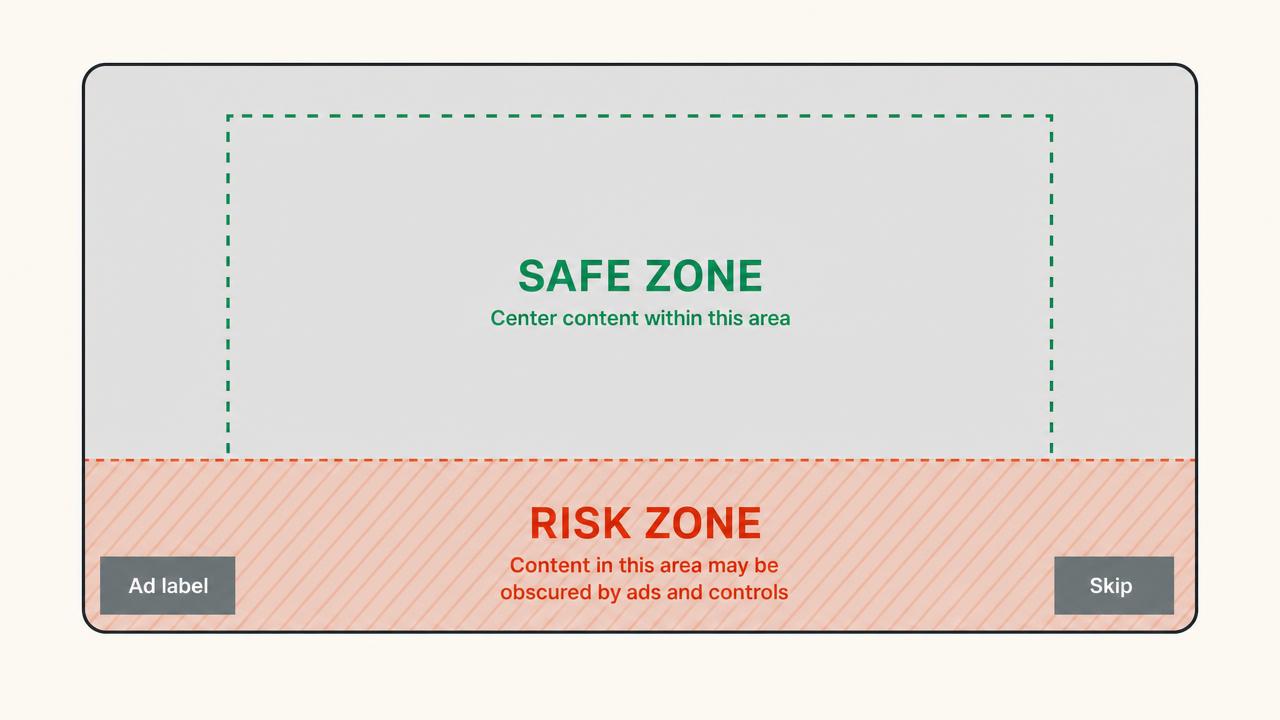
Skippable in-stream ads are the most common YouTube ad format. They play before, during or after a video at 1920x1080 pixels in a 16:9 aspect ratio, and the viewer can skip after 5 seconds.
UI elements that overlap your creative:
- Bottom-left: the ad label ("Ad" badge) and advertiser name, typically covering roughly the bottom 10% of the height and extending about 30% of the width from the left
- Bottom-right: the skip button, which appears after 5 seconds and sits in the lower-right corner on both mobile and desktop
- Bottom: a CTA companion banner or action overlay can appear across roughly 20% of the frame height when enabled
Safe zone guidance for skippable in-stream:
Keep all critical text, logos and product shots within the centre 80% of the frame horizontally and the top 70% of the frame vertically. The bottom 20% to 25% of a 16:9 in-stream ad is the highest-risk area, particularly on mobile where the skip button and ad overlay stack into the lower corners.
The first 5 seconds matter most. During that window the skip button has not appeared yet, but the ad label and advertiser name are already visible in the bottom-left. Keep your hook text out of that zone.
Practical rule: if your opening hook is a text overlay, place it in the upper two-thirds of the frame, horizontally centred. If you have a logo lockup, top-right is the safest position.
Non-skippable in-stream ads (16:9)
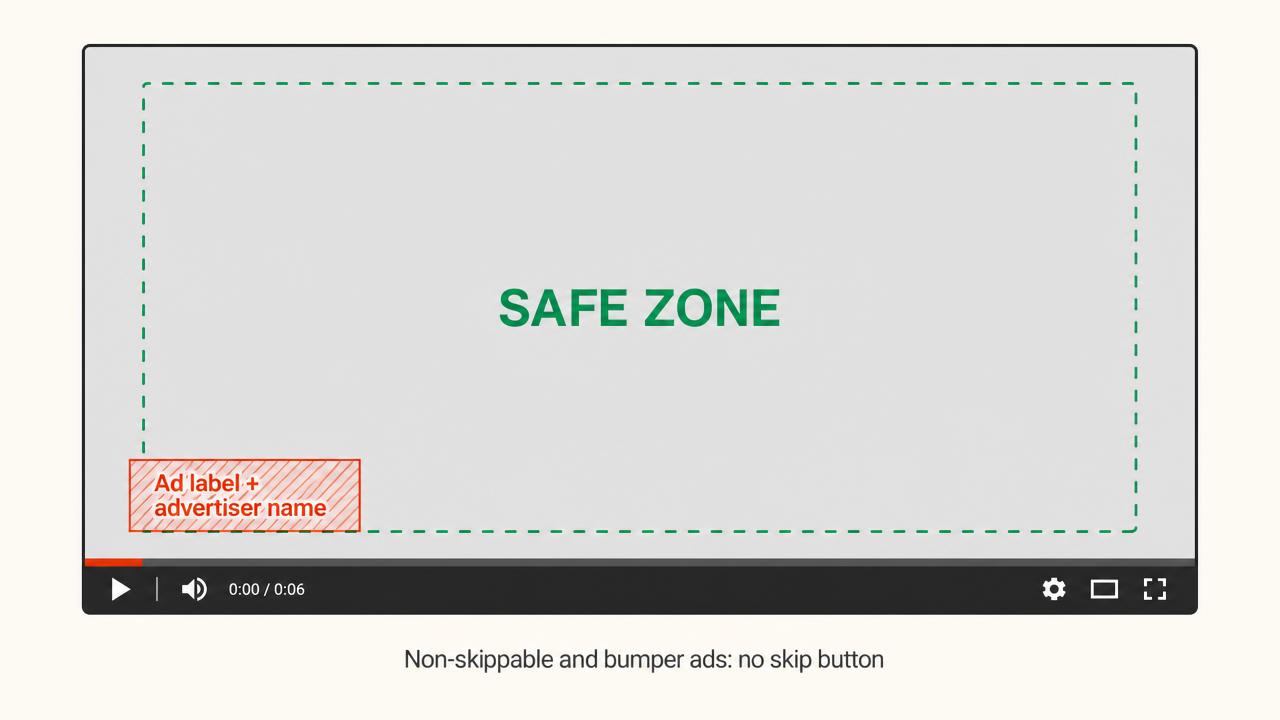
Non-skippable ads run at the same 1920x1080 spec in 16:9 and are typically 15 seconds long, with some markets allowing up to 20 seconds. The viewer cannot skip, which takes the skip button out of the equation, but the ad label, advertiser name and companion banner still apply.
Safe zone guidance for non-skippable:
The UI overlay footprint is smaller than for skippable ads because there is no skip button to work around. The bottom-left ad label is the primary constraint. Keep critical elements out of the bottom-left quadrant and you are largely safe.
The bigger creative consideration is that the viewer cannot leave, which changes the stakes. You do not need to front-load everything into the first 5 seconds. The safe zone implications are the same, but the creative structure is different.
Bumper ads (16:9, 6 seconds)
Bumper ads are non-skippable 6-second spots at the same 16:9 resolution. The safe zone rules are identical to non-skippable in-stream. The creative constraint is simply that you have 6 seconds to say one thing clearly, so every frame is load-bearing, which makes safe zone discipline even more important. A logo or text element covered by the ad label for even 2 of your 6 seconds is a significant share of your airtime.
Practical rule for bumpers: one message, centred. Nothing in the bottom-left quadrant. If you are showing a product, it should occupy the centre of the frame.
YouTube Shorts ads (9:16)
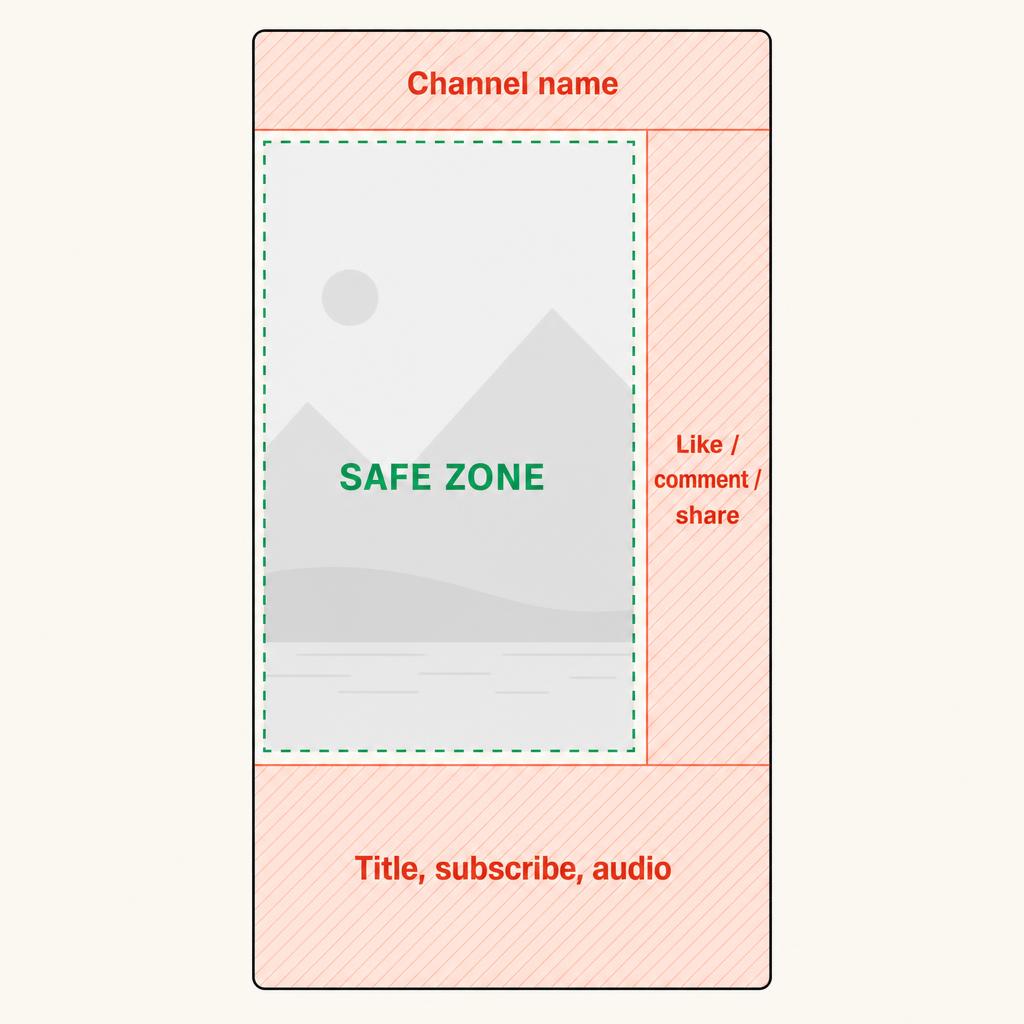
YouTube Shorts ads are vertical, full screen, and operate on completely different safe zone logic from horizontal formats. They appear in the Shorts feed between organic Shorts content.
Canvas size: 1080 x 1920 pixels at a 9:16 aspect ratio.
UI elements that overlay Shorts ads:
- Top (roughly 200 to 240 pixels, about 10% to 12% of frame height): channel name and overflow menu
- Right column (roughly 200 pixels, about 18% of frame width): like, dislike, comment and share buttons, plus the creator channel icon
- Bottom (roughly 250 to 380 pixels, about 13% to 20% of frame height): video title, subscribe button, audio track information, hashtags and the CTA button
A widely used working margin for Shorts is to keep everything critical inside a box that starts about 240 pixels from the top, ends about 380 pixels from the bottom, stays about 200 pixels clear of the right edge and about 60 pixels clear of the left edge. That leaves a usable safe area of roughly 820 x 1300 pixels in the middle-left of the frame.
Practical rule for Shorts: never place text or product in the bottom-right. That corner is the busiest part of the entire YouTube interface.
Why safe zones matter for ad performance
Most creative teams treat safe zones as a compliance issue. They are actually a performance issue.
Consider what happens when a key element falls outside the safe zone:
- A hook line in the first 3 seconds is partially covered by the ad label. The viewer reads half a sentence, loses context and skips.
- A CTA overlay appears in the final 5 seconds but sits behind the skip button on mobile. The viewer sees it on desktop but not on the device where the majority of YouTube watch time happens.
- A product shot is framed in the bottom-right corner of a Shorts ad, directly underneath the like, comment and share buttons. The product is effectively invisible.
None of these are rejection-level issues. YouTube will still serve the ad. But the creative underperforms and the team does not know why, because the problem is invisible in the preview environment and only shows up on the real player.
Pre-flight checklist before you launch
- Export a still from second 1, second 5 and the final second of every cut.
- Overlay the format's safe zone guides on each still and confirm nothing critical crosses the line.
- Preview on an actual phone in the YouTube app, not just in a desktop browser.
- Check both the skippable and non-skippable variants if you are running the same master creative in both placements.
- For Shorts, check the bottom-right corner specifically.
If you want to see how experienced advertisers handle this in practice, the fastest route is to study creatives that are already running at scale. Browse real YouTube ad examples and ecommerce ad examples to see where winning brands actually place their text, logos and CTAs.